
GSC Annotations Update: Google has introduced a powerful new upgrade to Search Console performance reports: custom annotations. Announced by the Search Console team on November 17, 2025, this feature allows users to place personalized notes directly on their performance graphs. For SEO professionals, content marketers, and website owners, this enhancement makes it much easier to link traffic fluctuations with specific actions or external events.
With this update, Google positions custom annotations as a built-in “contextual notebook” inside Search Console. The goal is to help users understand why performance changes occur by attaching clear, time-stamped notes to their data. Whether you have rolled out new content, fixed technical issues, or experienced an industry-wide shift, these annotations streamline the process of tracking what happened and when. Ultimately, this feature supports better decision-making and improves the way teams analyze search performance trends.

Official Update on the New Google Search Console Annotations Feature
In its recent announcement, Google explained the purpose of this enhancement:
“This feature allows you to add your own contextual notes directly on your performance charts. Think of it as a personal notebook for your Search data.”
The Search Console team emphasized that annotations can be used to label important moments such as design or template updates, site migrations, SEO adjustments, content strategy shifts, or even seasonal events that influence search activity. Because annotations are visible to all users who have access to the property, Google also cautions against adding confidential or sensitive information.
What the New Annotations Feature Brings to Search Console
1. Deeper Context for Performance Metrics
Custom annotations now appear as indicators across your performance graphs, giving you a quick and clear way to understand why impressions, clicks, or rankings fluctuated on a particular day.
2. A Centralized Log for Teams
This new Google Search Console feature acts like a shared activity log for SEO teams. Since every annotation is visible to all verified users of a property, it improves transparency and ensures that everyone is aligned on site changes and SEO actions.
3. More Accurate Tracking of Website and SEO Changes
Google outlined several scenarios where annotations can add real value:
- Major infrastructure updates or full site migrations
- Adjustments in SEO workflows, including new tools, plugins, or agency support
- Shifts in content strategy based on user intent or keyword research
- External events like holidays, marketing promotions, or algorithm shifts
By keeping these notes linked to specific dates, teams can more easily analyze performance trends and make better data-driven decisions.
How to Use Custom Annotations
Adding an annotation is simple. Just right-click on any performance chart, select “Add annotation,” choose a date, and write a note of up to 120 characters. The annotation will then appear as a visual marker on your chart.
This new Google Search Console feature is now live and accessible through the chart’s context menu. How to Use Custom Annotations
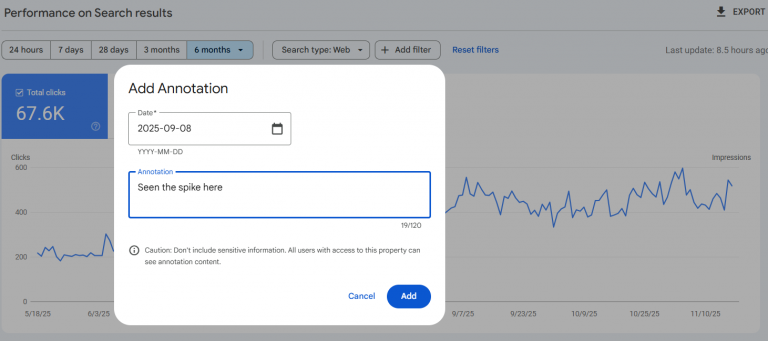
The Wider Influence on SEO Processes and Daily Workflows
Google’s rollout of custom annotations signals a deeper effort to transform Search Console into a more insightful and action-driven platform. Analyzing performance changes often requires revisiting past actions, sometimes from months earlier, and without documented logs, this becomes challenging. With the addition of annotations, Google Search Console now centralizes these essential notes, making historical analysis significantly easier.
For SEO agencies, web developers, content strategists, and business owners, this enhancement strengthens team communication and eliminates unnecessary guesswork. It creates a clear, time-stamped record of important updates within the same platform used for monitoring search visibility. When audits, performance reviews, or unexpected traffic drops occur, annotations help teams quickly identify what changed and when it happened.
This feature becomes especially helpful during major transitions such as website migrations, CMS upgrades, content strategy shifts, and predictable seasonal fluctuations, all of which commonly influence search performance.
FAQs
How does the new Google Search Console feature help SEO teams?
This Google Search Console feature provides SEO teams with a shared, visual log of site updates, migrations, or content changes, reducing guesswork and improving collaboration and performance tracking.
How do I add custom annotations in Google Search Console?
To use this Google Search Console feature, right-click a chart, select “Add annotation,” choose a date, and write up to 120 characters describing the change.